Tuto - An early stage learning app for kids
A 2-week conceptual project focused on combining play and education to make language learning more enjoyable for children and parents.
UX
UI
Research

My Role
UX & UI Design
Research
Tools
How can we provide a fun, interactive experience for kids to boosts their language skills through structured and playful activities?
Problem Statement
Many non-native English-speaking parents are looking for ways to help their kids develop their English speech and language skills. They often turn to platforms like Youtube and TV cartoons. However, these platforms raise concerns about the unrestricted, passive and potentially harmful content their children may be exposed to through these platforms. Additionally, the issue of excessive screen time for kids is a major concern for parents, making it difficult for them to balance language development and screen time.
The Design Process
Understanding the Problem and the User
Research Insights and Design Implications
Ideate
Design
Understanding the Problem and the User
30+
Research Papers
20+
Education apps reviewed
6
1-on-1 Informal Chats with families having kids between 1 year and 5 years old
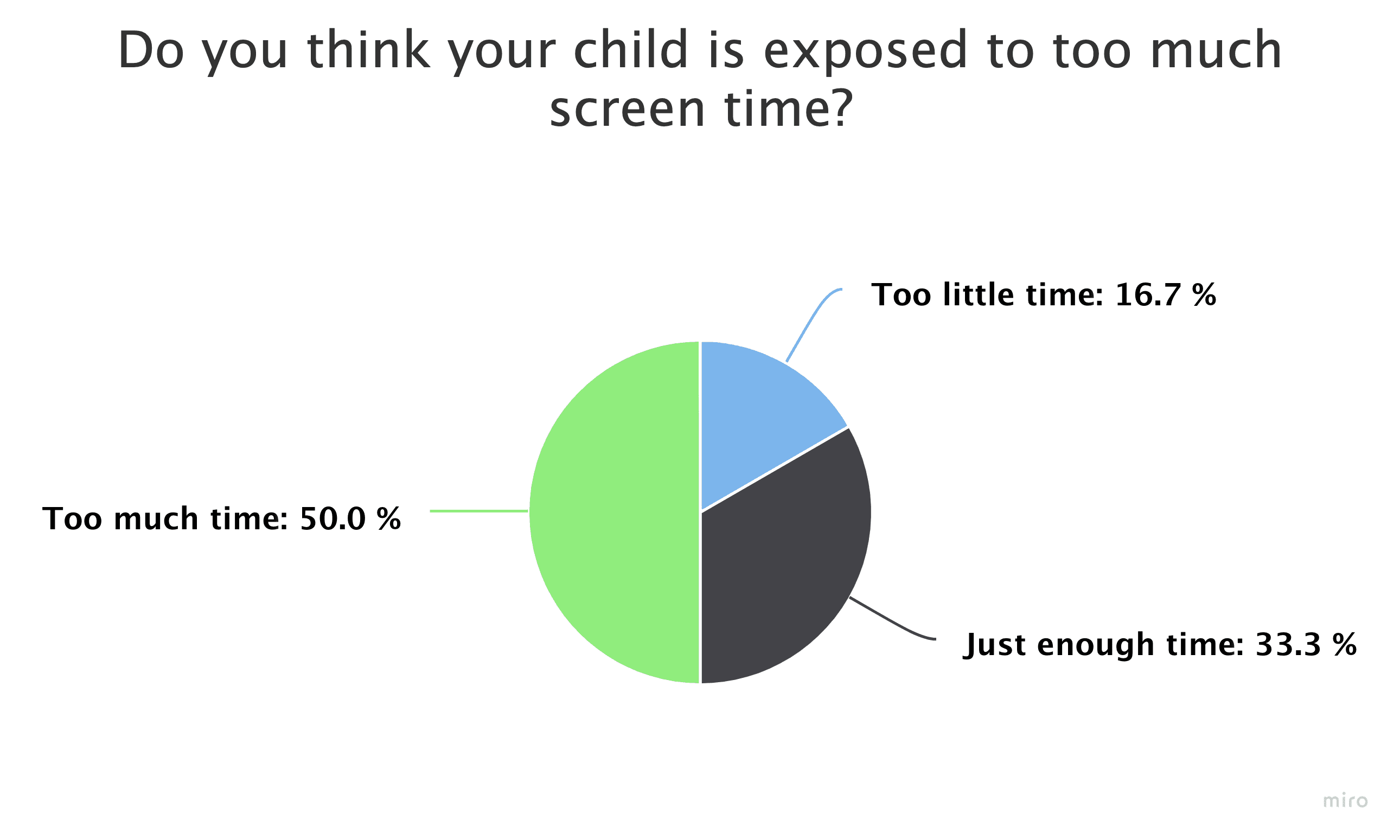
Insights from User Interviews on Screen Time, Language Development Support, and Platform Preferences


Affinity Mapping
I synthesised all the information I gathered during the user interviews with an affinity diagram to uncover key insights and design implications.

Insights
Parents often look for multiple sources to cater to kids’ language and speech development needs.
Finding curated content focusing on language development in a multi-interactive format is difficult.
The excessive and passive nature of screen time is a cause of concern among parents.
After drawing insights from the user interviews and secondary research, I defined solutions with “How might we…” statements. This gives me a basis to think about possible design opportunities I could work on.
How might we…
encourage active screen time for kids to encourage interaction?
Acknowledge the time constraints of the parent/adult in the product design?
Provide content, activities, and lesson plans catering to kids of all ages and interests?
Design the product to be multi-dimensional to extend the functions and activities to the real world
Design Implication
After discovering the key problem areas using research insights and exploring possible solutions through ‘how might we..’ statements, I noted down some key design consideration to have in place as I begin ideating the solutions. This immensely helps me in not loosing the track of the challenges to focus on while designing.
Multi-sensory, interactive experience ensures active screen engagement
Daily activities
Functional UI with limited use of text to make it intuitive for kids and parents
Provide content and activities personalised to age and interests
Features to save and repeat lessons and activities.
Progress tracking for specific goals, activities and lesson plans
Ideate
After gaining clarity on the key opportunity areas, I used user flow to lay out the features of the product and visualise what journey a user might take.
User Flow

The Solution
Tuto is a fun and interactive language learning app designed to make language development easy and accessible for children and parents.
Personalised content to age and interests
Designed to make it easy for parents to set up their child's profile, including their age and interests. Once the profile is set up, the app will automatically present age-appropriate content and activities that align with the child's interests, making the learning experience more engaging and effective.


Progress tracking for specific goals, activities and milestones
This feature provides detailed information on the child's progress for specific activities and milestones, such as mastering a certain number of vocabulary words or completing a certain number of exercises. This feature allows parents to be more engaged in their child's language development.
Multi-sensory, interactive experience ensures active screen engagement.
Tuto features interactive exercises and active engagement methods that use different sensory outputs. The app includes interactive exercises and games, visual aids, and audio recordings, which use a combination of visual, auditory, and kinaesthetic inputs to help children learn.


Progress tracking for specific goals, activities and milestones
This feature provides detailed information on the child's progress for specific activities and milestones, such as mastering a certain number of vocabulary words or completing a certain number of exercises. This feature allows parents to be more engaged in their child's language development.


Onboarding screens are designed to gather important information about the child and their language learning needs.
Take Away
Crafting for children and adults alike: The necessity of designing a visually captivating interface that attracts both younger and older audiences.
Discovering the perfect equilibrium between classic and electronic entertainment: It provoked a newfound perspective on how digital elements can supplement and bolster classic play activities, engendering a smooth symmetry between the two.